

Step 1
Download G Stream Cable App For iOS & Android Devices
For Android Devices

(Note: G Cable Pro only works on Android Devices, Smart TV Boxes, TVs, smartphones, Tablets, and other Android-powered devices)
Or
Download Smarters Lite For Ios Devices

(Note: IPTV Smarters for G Cable Pro only works on iPhones, iPads, and other non-Android Devices.)
Note: You can also download the apps via the customer dashboard


From the app corner, you can select your service provider’s service device app
Step 2
Sign in to your dashboard

Click On The My Service View Detail Button
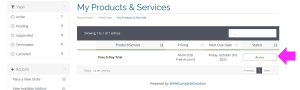
Click on the listed service you want to access
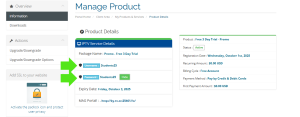
From the product details page, you will find both your username and password along with your subscription information and upgrade options.
Step 3

From the product details page, scroll down to the bottom of the page and click on the setup guide button.
Step 4

- Click the Add user button
Step 5

Name the device (ie, Bedroom, Phone)
From the customer panel, copy and paste both your username and password
Completion
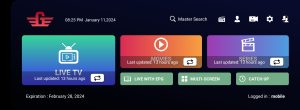
Once this screen appears, your setup is complete.
For iOS
For iOS devices, follow the above steps 1-3
Step 4

Click on the XTREAM CODE button
Step 5

Name the device (ie, Bedroom, Phone)
From the customer panel, copy and paste both your username and password
Step 6

For the http URL, copy and paste this URL: http://ky-tv.cc:25461
Completion
Once this screen appears, your setup is complete.


